Tracing AI Agents on Google Cloud with OpenTelemetry and Agent Engine

Table of Contents
Overview
AI agents are transforming the way we interact with technology. They can reason, make decisions, and orchestrate multiple tools or APIs to accomplish complex tasks — effectively acting as intelligent assistants that understand context and adapt on the fly. Google’s Agent Development Kit (ADK) makes it easy to build such agents, providing a framework for creating structured, tool-using agents that return reliable, actionable outputs.
When deployed on Google Agent Engine, these agents gain the benefits of a fully managed, scalable environment with built-in security, telemetry, and integration with observability tools. This makes it easy to run AI agents in production safely and efficiently.
Agent Engine telemetry is extremely easy to enable. You simply set a couple of environment variables to True, and grant the agent service account the roles/cloudtrace.agent and roles/logging.logWriter roles. After that, telemetry starts flowing automatically. Once enabled, Agent Engine integrates directly with Google Cloud’s operations suite, meaning you can use Google Cloud Monitoring to view metrics, Google Cloud Trace to inspect distributed traces and latency breakdowns, and Google Cloud Logging to analyze structured logs and debug execution issues. The UI is unified inside the Google Cloud Console, where you can correlate logs, traces, and metrics for a given request, filter by service or revision, and drill down into individual spans.
However, if parts of your system span multiple clouds — GCP, AWS, or Azure — relying only on cloud-native tools can fragment visibility and make monitoring cumbersome. In those cases, it can be more convenient to centralize telemetry in a vendor-neutral platform such as Langfuse or Braintrust, where traces, evaluations, prompts, and model metrics from multiple cloud providers can be analyzed in one place. This approach simplifies monitoring, reduces context switching between consoles, and provides a consistent observability layer across a multi-cloud architecture.
Rather than sending traces directly from agents to Langfuse or Braintrust, we chose to deploy an Open Telemetry Collector on Cloud Run. The OTel Collector is a vendor-neutral telemetry pipeline designed to receive, process, and export observability data such as traces, metrics, and logs. It works by exposing receivers (OTLP over HTTP/gRPC, Prometheus and Jager) that accept telemetry from instrumented services, then passing that data through optional processors for batching, filtering, enrichment, sampling, or transformation, and finally forwarding it to one or more exporters (such as Cloud Trace, Prometheus, Langfuse, Braintrust or other backends). This decouples application code from observability backends, allowing teams to change destinations or processing logic without modifying services.
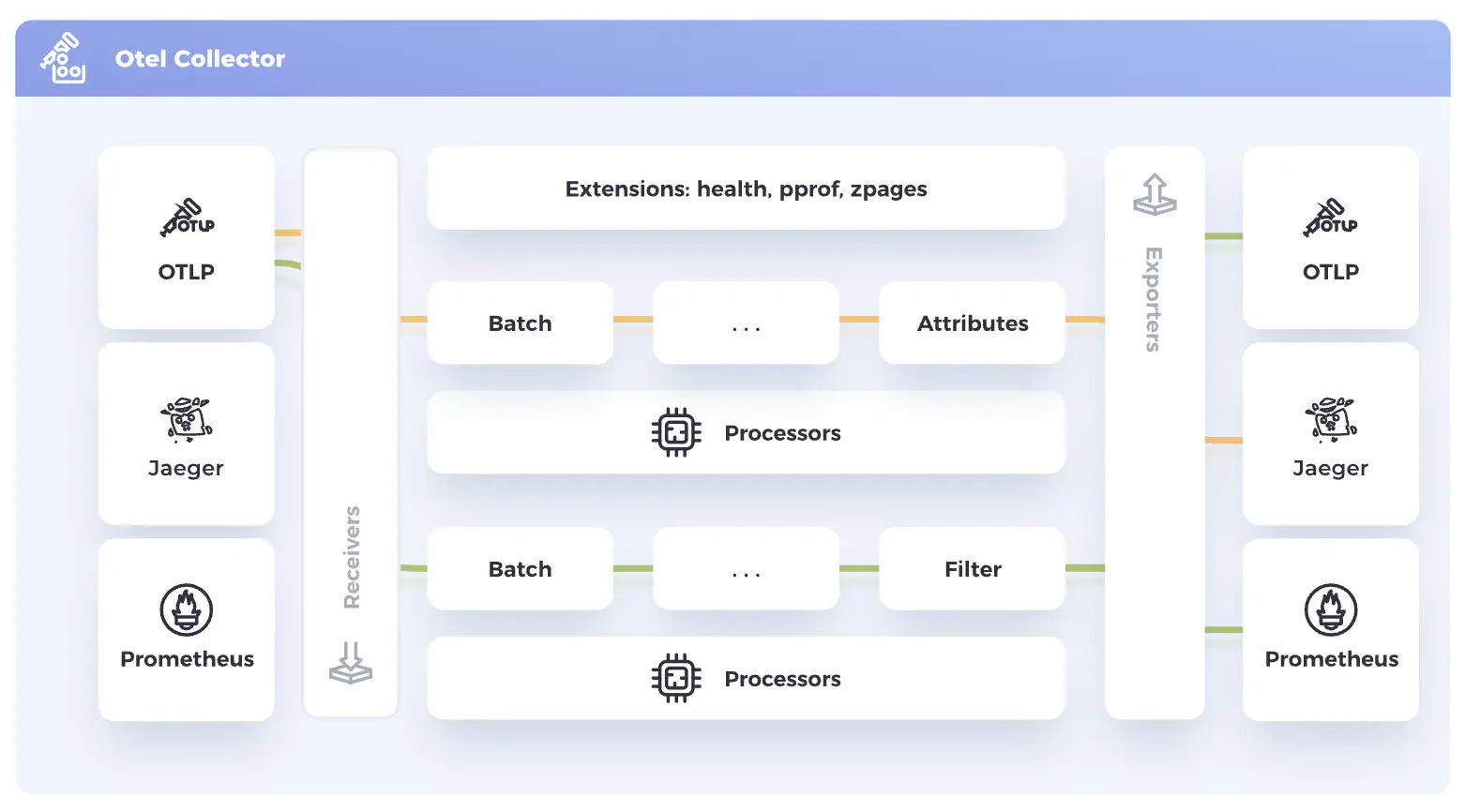
Figure 1 — OpenTelemetry Architecture
Source: OpenTelemetry, CC BY 4.0 (https://opentelemetry.io). Adapted for clarity and blog presentation.
The main advantages of this approach are:
- flexibility,
- backend independence,
- centralized control,
- multi-destination export,
- consistent telemetry handling across environments or clouds.
However, it also introduces additional operational overhead, configuration complexity, and another infrastructure component that can become a bottleneck or single point of failure if not properly scaled and monitored.
Architecture
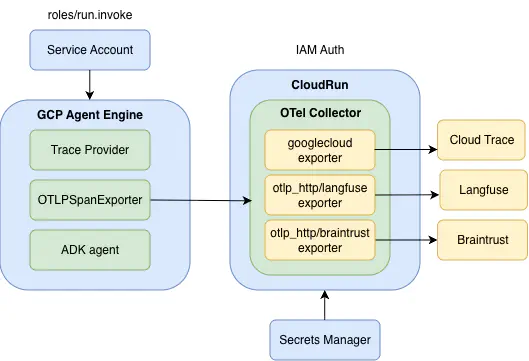 Figure 2 - Architecture diagram showing integration of Google Agent Engine with OTel Collector running on CloudRun Service
The ADK agent is deployed on Google Agent Engine with built-in telemetry enabled. The telemetry collected for the agent is exported to an OTel collector deployed on a CloudRun service. Instead of replacing the TracerProvider created by Agent Engine, a custom OTLP exporter is appended to the existing provider. This approach preserves the stability and internal insights provided by Agent Engine while also enabling centralized observability, custom dashboards, and integration with additional monitoring tools.
To enable the built-in telemetry, the following environment variables must be set to True:
- GOOGLE_CLOUD_AGENT_ENGINE_ENABLE_TELEMETRY
- OTEL_INSTRUMENTATION_GENAI_CAPTURE_MESSAGE_CONTENT.
The first variable activates Agent Engine’s built-in telemetry integration, while the second enables capture of GenAI message content in OpenTelemetry spans, providing deeper visibility into prompts and responses for debugging and analysis.
The service account attached to the Agent Engine has the following roles:
- roles/aiplatform.user
- roles/discoveryengine.editor
- roles/cloudtrace.agent
- roles/logging.logWriter
- roles/serviceusage.serviceUsageConsumer
- roles/secretmanager.secretAccessor (to access Braintrust and Langfuse API keys stored in Secrets Manager)
- roles/run.invoker (to invoke OTel Collector CloudRun service)
OTel Collector Configuration
The current OpenTelemetry Collector configuration includes three exporters: Langfuse, Braintrust, and Google Cloud Trace & Logging. Using multiple exporters allows you to compare platforms and gain a comprehensive view of their strengths and weaknesses. This approach is particularly useful in multi-cloud architectures or when benchmarking observability tools against each other.
- Braintrust and Langfuse Authorization
To set up exporters for Langfuse and Braintrust, you first need to sign up for these services, create an organization and project in each, and generate API credentials: an API key for Braintrust and public/secret keys for Langfuse. We store these keys securely in Google Secret Manager.
Authorization headers for the OTel Collector:
-
Braintrust:
-
Authorization: Bearer ${BRAINTRUST_API_KEY}
-
x-bt-parent: project_id:${BRAINTRUST_PROJECT_ID}
-
-
Langfuse:
- Authorization: Basic ${LANGFUSE_AUTH_HEADER}
Here, LANGFUSE_AUTH_HEADER is a base64-encoded string in the format public_key:secret_key.
- CloudRun Integration
The Cloud Run service exposes port 8080, so the OpenTelemetry (OTel) Collector’s receiver must be configured to use the OTLP HTTP protocol, listening on all network interfaces at the endpoint 0.0.0.0:8080. This ensures that telemetry data sent from the Agent Engine can reach the collector inside the Cloud Run container.
Cloud Run needs a health check to verify that the service is running. By adding a health_check extension on port 13133 in the OTel Collector, the deployment can complete successfully. Remember to expose the port 13133 in the Dockerfile for OTel Collector (see Deploying the OpenTelemetry Collector to Google Cloud Run section).
The OTel Collector configuration, otel-config.yaml:
receivers:
  otlp:
    protocols:
      http:
        endpoint: "0.0.0.0:8080"

processors:

extensions:
  health_check:
    endpoint: "0.0.0.0:13133"

exporters:
  debug: {}
  otlp_http/langfuse:
    endpoint:  https://cloud.langfuse.com/api/public/otel
    headers:
      Authorization: Basic ${LANGFUSE_AUTH_HEADER}
  otlp_http/braintrust:
    endpoint: https://api.braintrust.dev/otel
    headers:
      Authorization: Bearer ${BRAINTRUST_API_KEY}
      x-bt-parent: project_id:${BRAINTRUST_PROJECT_ID}
  googlecloud: {}
  googlecloud/logs: {}

service:
  extensions: [health_check]
  pipelines:
    traces:
      receivers: [otlp]
      processors:
      exporters: [debug, otlp_http/langfuse, otlp_http/braintrust, googlecloud, googlecloud/logs]
Deploying the OpenTelemetry Collector to Google CloudRun
- Dockerfile
The OTel Collector container is deployed as a Cloud Run service using the official OpenTelemetry Collector Docker image. A custom configuration file (otel-config.yaml) is copied into the container to define receivers, processors, and exporters.
Three ports are exposed:
- 8080 – for receiving telemetry data (OTLP HTTP receiver)
- 13133 – for health checks (used by Cloud Run to verify the service is running)
- 1888 – for debugging and diagnostics
Exporters do not require any fixed ports on the container itself. Instead, they send outbound HTTPS requests to backend endpoints (for example, observability platforms or cloud APIs).
FROM otel/opentelemetry-collector-contrib:latest

COPY otel-config.yaml /etc/otel-config.yaml

EXPOSE 1888 13133 8080

CMD ["--config", "/etc/otel-config.yaml"]
- Container Deployment
The Cloud Run service can be deployed in multiple ways — for example, using a Terraform module, a Cloud Build trigger, or a GitHub Actions workflow. Here, I show a Bash deployment script that:
- builds the Docker image
- pushes the image to an existing Artifact Registry repository
- retrieves required secrets
- deploys the Cloud Run service.
NOTE: Currently, only linux/amd64 architecture is supported.
#!/usr/bin/env bash
set -euo pipefail

PROJECT_ID="<gcp_project_id>"
REGION="<region>"
SERVICE_NAME="<cloudrun_service_name>"
REPOSITORY="<artifact_registry_repository_name>"
IMAGE_NAME="<image_name>"
TAG="latest"
SERVICE_ACCOUNT_EMAIL="<service_account_email>"
BRAINTRUST_PROJECT_ID="<braintrust_project_id>

# Full image path
IMAGE_URI="${REGION}-docker.pkg.dev/${PROJECT_ID}/${REPOSITORY}/${IMAGE_NAME}:${TAG}"

# Auth and Config
echo "Setting gcloud project..."
gcloud config set project "${PROJECT_ID}"

echo "Configuring Docker for Artifact Registry..."
gcloud auth configure-docker "${REGION}-docker.pkg.dev"

# Build image (Amd64)
cd otel_collector
echo "Building Docker image for amd64..."
docker buildx build \
    --platform linux/amd64 \
    -t "${IMAGE_URI}" \
    --push .

# Fetch secrets from Secret Manager
LANGFUSE_PUBLIC_KEY=$(gcloud secrets versions access 2 --secret="langfuse-public-key" --project="$PROJECT_ID")
LANGFUSE_SECRET_KEY=$(gcloud secrets versions access 2 --secret="langfuse-secret-key" --project="$PROJECT_ID")

LANGFUSE_AUTH_HEADER=$(printf "%s:%s" "$LANGFUSE_PUBLIC_KEY" "$LANGFUSE_SECRET_KEY" | base64)

# Deploy CloudRun service
echo "Deploying to Cloud Run..."
gcloud run deploy "${SERVICE_NAME}" \
    --execution-environment gen2 \
    --image "${IMAGE_URI}" \
    --region "${REGION}" \
    --platform managed \
    --set-env-vars GOOGLE_CLOUD_AGENT_ENGINE_ENABLE_TELEMETRY=true \
    --set-env-vars OTEL_INSTRUMENTATION_GENAI_CAPTURE_MESSAGE_CONTENT=true \
    --set-env-vars LANGFUSE_AUTH_HEADER=$LANGFUSE_AUTH_HEADER \
    --set-secrets BRAINTRUST_API_KEY=braintrust-api-key:latest \
    --set-env-vars BRAINTRUST_PROJECT_ID=$BRAINTRUST_PROJECT_ID \
    --min-instances 1 \
    --max-instances 1 \
    --service-account "${SERVICE_ACCOUNT_EMAIL}" \
    --no-allow-unauthenticated

echo "Deployment complete."
The environment variables LANGFUSE_AUTH_HEADER, BRAINTRUST_API_KEY, and BRAINTRUST_PROJECT_ID are referenced in the OTel Collector configuration file and are used by the exporters to authenticate with external observability backends.
The Cloud Run service is deployed with the –no-allow-unauthenticated flag, which means the service is private and requires authentication for every request. Any caller must have the appropriate IAM permissions and include a valid JWT identity token in the request. The Agent Engine service account is granted the roles/run.invoker role to allow it to invoke the Cloud Run service.
The process of generating and attaching the JWT token is described in the next section.
Deploying the ADK Agent to Agent Engine
There are a few important details to keep in mind when you try to integrate Agent Engine with CloudRun OTel Collector:
- the telemetry setup must run before the agent initializes
- the CloudRun OTel Collector endpoint requires TLS
- the CloudRun service is private, so JWT-based authorization is required.
- Verifying TLS Connectivity
Before configuring telemetry, let’s performs a simple TLS check against the OTel Collector Cloud Run service:
import ssl, socket

hostname = "<service_name>-<gcp_project_number>.<region>.run.app"
context = ssl.create_default_context()
with socket.create_connection((hostname, 443)) as sock:
    with context.wrap_socket(sock, server_hostname=hostname) as ssock:
        print(ssock.version())
This confirms that:
- the collector is reachable
- HTTPS is working correctly
- the TLS handshake succeeds
Since Cloud Run services use HTTPS, communication happens over port 443.
- Handling Authorization (Auto-Refreshing ID Token)
Because the Cloud Run service was deployed with –no-allow-unauthenticated, every request must include a valid Google-signed identity token (JWT). The AutoRefreshIDToken class handles:
- fetching an ID token for the collector’s URL (audience)
- automatically refreshing it before expiration
- injecting it into the OTLP exporter headers
from google.oauth2 import id_token
from google.auth.transport.requests import Request
import time

class AutoRefreshIDToken:
    def __init__(self, audience):
        self.audience = audience
        self.token = None
        self.expiry = 0

    def get_token(self):
        if not self.token or time.time() + 60 > self.expiry:
            request = Request()
            self.token = id_token.fetch_id_token(request, self.audience)
            self.expiry = time.time() + 240
        return self.token

audience = f"https://{hostname}"
token_provider = AutoRefreshIDToken(audience)
- Setting Up OpenTelemetry
Telemetry must be configured before the agent starts, otherwise spans may not be captured or exported correctly. The setup_telemetry() function extends the telemetry that is already initialized by Agent Engine rather than replacing it. Specifically, it:
- initializes the FastAPI application for the agent
- adds a
/healthzendpoint for readiness checks - retrieves the existing TracerProvider created by Agent Engine
- appends a custom OTLP HTTP exporter pointing to the Cloud Run collector
- attaches a Bearer token for secure authorization
- enables automatic ADK instrumentation
Importantly, the function does not create a new TracerProvider. Agent Engine already configures one when built-in telemetry is enabled. Replacing it would break the platform’s native tracing.
import os
from opentelemetry.sdk.resources import Resource
from opentelemetry import trace
from opentelemetry.sdk.trace import TracerProvider
from opentelemetry.sdk.trace.export import SimpleSpanProcessor
from opentelemetry.exporter.otlp.proto.http.trace_exporter import OTLPSpanExporter

def setup_telemetry() -> str | None:
    """Configure OpenTelemetry"""

    otel_exporter_url = os.environ.get("OTEL_EXPORTER_OTLP_ENDPOINT", f"https://{hostname}/v1/traces")

    app = get_fast_api_app(agents_dir="<agent_directory_name>", web=False, otel_to_cloud=True)
    app.add_api_route("/healthz", lambda: {"status": "ok"}, methods=["GET"])
    provider = trace.get_tracer_provider()
    provider.add_span_processor(
        SimpleSpanProcessor(
            OTLPSpanExporter(
                endpoint=otel_exporter_url,
                headers={
                    "Authorization": f"Bearer {token_provider.get_token()}"
                }
            )
        )
    )

    GoogleADKInstrumentor().instrument()
- Integrating Telemetry into the Agent Engine App
A custom AgentEngineApp class extends AdkApp and ensures telemetry is initialized during setup:
from typing import Any
import vertexai
from google.cloud import logging as google_cloud_logging
from vertexai.agent_engines.templates.adk import AdkApp
import logging

class AgentEngineApp(AdkApp):
    def set_up(self) -> None:
        """Initialize the agent engine app with logging and telemetry."""
        vertexai.init()
        super().set_up()
        setup_telemetry()
        logging.basicConfig(level=logging.INFO)
        logging_client = google_cloud_logging.Client()
        self.logger = logging_client.logger(__name__)
- Wiring the Agent
Finally, the agent is wrapped with the custom AgentEngineApp:
from google.adk.agents.llm_agent import Agent
from google.adk.apps.app import App

root_agent = Agent(
    model="gemini-2.5-flash",
    name="<agent_name>",
    instruction="<prompt>"
)
app = App(root_agent=root_agent, name="<agent_name>")
agent_engine = AgentEngineApp(
    app=app,
    artifact_service_builder=lambda: InMemoryArtifactService()
)
This ensures that the agent runs inside Agent Engine, telemetry is active, artifacts are stored in memory, and traces are exported securely to the Cloud Run OTel Collector.
- Agent Deployment
Deploying an ADK agent to Google Agent Engine involves several steps to package the agent, set environment variables, and register it with the engine. In practice, this can be done via Python scripts, Terraform, or other automation tools. Community guides on Medium (https://medium.com/google-cloud/deploy-your-agent-engine-with-terraform-the-enterprise-way-f918becff0c8) provide a thorough walkthrough of the standard deployment process, so I won’t repeat those details here. I used a custom Python script to automate key steps such as:
- collecting environment configuration — project ID, region, resource limits, environment variables, and labels
- generating agent metadata — inspecting the agent’s registered operations so Agent Engine knows what actions it can perform
- creating or updating the Agent Engine — the script checks if an agent with the same name exists and updates it if needed, or creates a new one otherwise
- packaging dependencies — ensuring that the agent code and any required libraries are included in the deployment package.
Testing the agent deployed to Agent Engine confirmed that traces appeared in all three destinations—Langfuse, Braintrust, and Cloud Trace & Logging—simultaneously, demonstrating that multi-export telemetry works as intended.
Summary
Running ADK agents on Google Agent Engine with a Cloud Run OpenTelemetry (OTel) Collector gives you centralized observability across platforms like Langfuse and Braintrust, while still keeping the built-in Agent Engine telemetry. This setup does not require modifying the agent itself. The trade-off is added complexity: you must configure the collector, manage credentials, and handle the additional telemetry pipeline, which requires extra effort and ongoing maintenance.